Motion Sensor Light Not Working? 7 Common Problems (and How to Fix Them)
Key takeaways
- Most motion-sensor light problems come down to the time delay, the lux (daylight) setting, sensor placement, or the wrong sensor type for the room.
- If the light cuts out while you're sitting still, you usually need a longer delay or a presence sensor instead of a basic PIR.
- False triggers are almost always heat or airflow — AC, fans, sunlight, or a sensor mounted facing the wrong way.
- A few fixes need the switch box opened; if you're not comfortable with wiring, that's the point to call an electrician.
You walk into the bathroom, the light snaps on — perfect. Two minutes later you're at the basin and… click, darkness. Sound familiar?
Motion sensor lights are genuinely brilliant when they behave, and genuinely irritating when they don't. The good news is that almost every problem traces back to one of about seven things, and most you can sort out yourself in five minutes — no electrician, no new device. Let's walk through them, starting with the quick checks.
First, the 10-second check
Before blaming the sensor: is there power? Glance at the MCB, and make sure the bulb itself isn't fused. It sounds obvious, but a surprising number of "dead" sensors are just a tripped breaker or a blown LED. Once you've ruled that out, here are the real culprits.
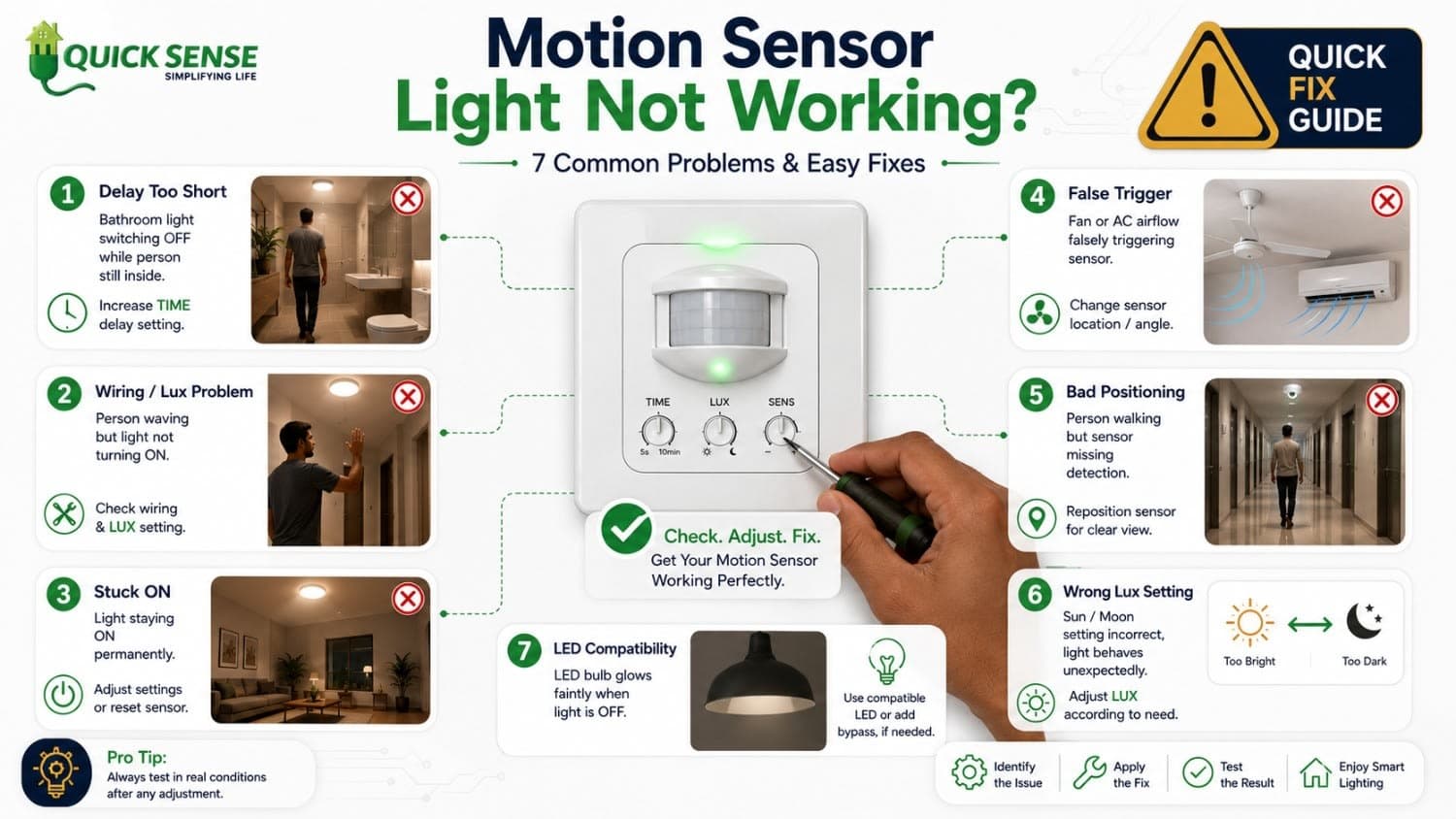
1. The light switches off while you're still there
This is the complaint I hear most. You're sitting at your desk, or standing under the shower, and the light gives up on you. Here's why: a standard PIR sensor reacts to movement, not presence. Sit still long enough and it decides the room is empty.
Two fixes. The easy one — bump up the time delay (the dial that sets how long the light stays on after the last movement). The proper one — for rooms where people genuinely stay put, like a study or office cabin, switch to a presence sensor, which picks up the tiny micro-movements PIR misses. If you're choosing between the two, this comparison helps: presence sensors vs motion sensors.
2. It won't turn on at all
Power's fine but nothing happens? A few things to check, in order:
- Wiring. Open the switch (power OFF first) and confirm line and load are on the right terminals per the sensor's manual. A swapped connection is the usual cause.
- Lux setting. If the daylight dial is set to "only at night," the sensor will sit there in the daytime doing nothing — working exactly as configured.
- Load compatibility. Very low-wattage LEDs sometimes don't register. Make sure the sensor is rated for LED loads.
3. It stays on permanently
The opposite problem. Usually it's one of three things: the unit is still in test mode (check the manual for how to exit), the time delay is cranked to maximum, or — more often — something in the room is constantly "moving" in the sensor's eyes. Which brings us to the big one.
4. It triggers on its own (the classic false trigger)
If your light keeps flicking on with nobody around, the sensor isn't haunted — it's reacting to heat or airflow. In Indian homes and offices the usual suspects are:
- An AC or fan pushing warm/moving air across the detection zone.
- Direct sunlight or a hot wall warming up through the day.
- A heater, geyser, or even a fridge nearby.
- Moving curtains, or a pet wandering through.
Re-aim the sensor away from vents and windows, and dial the range/sensitivity down so it covers the area you care about and nothing more.
5. It misses you or has poor range
Walk in and the light hesitates — or only catches you halfway across the room. Mounting is usually the issue. PIR sensors detect movement best across their field of view, not straight toward them, and they have an ideal height (check the spec — often around 2–2.5 m). Furniture, a half-open door, or a glass partition can block them too.
One India-specific quirk: in peak summer, when the room temperature gets close to body temperature, a cheap PIR has less heat contrast to work with and can feel sluggish. A better-quality sensor handles this far more gracefully — see what to look for in our guide to the best motion sensor switches. For large or partitioned areas, a microwave sensor often works better; here's the difference between PIR, microwave, and radar sensors.
6. It works at night but not in the day (or vice versa)
That's the lux setting again. Almost every sensor has a small dial that decides how dark it must be before the light is allowed to switch on. If you want the light only after dusk, set it accordingly. If you want it any time someone enters, turn lux to its most sensitive. Get this right and you also stop the light wasting power in broad daylight — a small thing that adds up, as we cover in how motion sensors cut energy bills.
7. The LED glows faintly even when it's "off"
A dim afterglow on an LED that's supposed to be off is almost always a no-neutral sensor switch leaking a tiny current through an LED load. The clean fix is to use a sensor designed for LED loads, or fit the small bypass/load the manufacturer specifies. It's a known quirk, not a fault in your wiring.
When to stop and call an electrician
Most of the above is dial-twiddling and re-aiming — safe for anyone. But the moment a fix needs you to open the switch box and you're not confident around live wiring, stop. There's no prize for guessing with mains electricity. A good electrician will sort the wiring in minutes.
Still stuck?
If you've worked through these and the sensor still won't behave, it may simply be the wrong type for that space — or a low-quality unit worth replacing. Tell us the room and the problem and we'll point you to the right sensor: get in touch, or browse the motion sensor range.