Office Occupancy Sensors: The Complete Guide to Cutting Commercial Energy Bills in India (2026)
Key takeaways
- Lighting and HVAC are the biggest controllable costs in most Indian offices — and much of it is wasted on empty spaces.
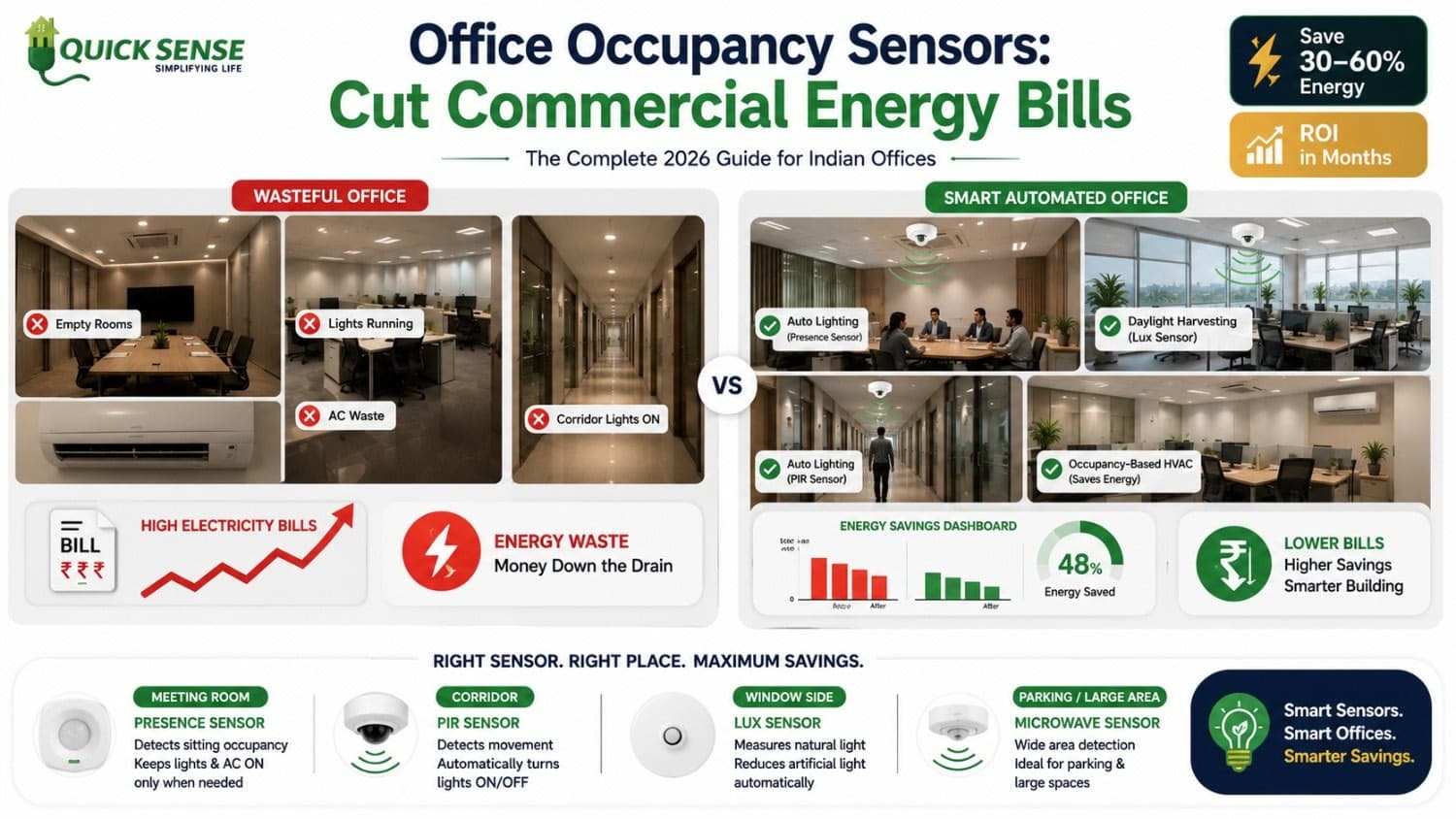
- Occupancy sensors auto-switch lights (and can trigger HVAC) based on real presence, typically cutting lighting energy 30–60%.
- Use occupancy/presence sensors for cabins and meeting rooms, PIR for corridors and washrooms, and daylight sensors near windows.
- Because commercial lighting runs 10–12 hours a day, payback is usually months — and savings multiply across floors and branches.
In most Indian offices, the lights in half the cabins, meeting rooms, and corridors are on right now — whether or not anyone is in them. Lighting and HVAC are the two biggest controllable costs in a commercial building, and a surprisingly large share simply burns in empty spaces for 10–12 hours every working day. Occupancy sensors are the single highest-ROI fix for this: they make every light respond to real presence, not habit. This guide explains exactly how they cut commercial energy bills, where to use them, and what payback to expect.
What is an occupancy sensor?
An occupancy sensor detects whether a space is being used and controls the lights (and optionally HVAC) accordingly — on when occupied, off when vacant. The detection technology varies:
- PIR (Passive Infrared): senses body heat and movement — reliable and affordable for corridors, washrooms, and store rooms.
- Microwave: covers wider areas and sees through thin partitions — good for large halls and basements.
- mmWave radar / presence: detects even tiny micro-movements, so lights stay on while people sit still at desks or in meetings.
Not sure which technology fits where? Our guide on PIR vs microwave vs radar sensors breaks it down in detail.
Why do offices waste so much lighting energy?
The problem is structural, not careless:
- Intermittent-use rooms stay lit. Meeting rooms, cabins, washrooms, and store rooms are occupied only part of the day but lit the entire shift.
- Last-person-out rarely switches off. In shared areas, no one owns the switch.
- Daylight is ignored. Window-side workstations are brightly lit even on sunny afternoons.
- Long operating hours. Commercial lighting commonly runs 10–12 hours a day, six days a week — so every wasted watt is multiplied.
How do occupancy sensors cut commercial electricity bills?
1. Light only-occupied spaces
This is the core win. Lights switch on the moment someone enters and off shortly after they leave — typically a 30–60% reduction in lighting energy for those zones. The same principle that powers home savings (see how motion sensors cut energy bills) scales dramatically in a multi-room office.
2. Harvest daylight
Lux-based sensors dim or switch off electric lights near windows when natural light is sufficient, keeping a steady brightness without waste.
3. Zone and schedule
Group lights by area (workstations, cabins, corridors, parking) so each follows its own occupancy rule and operating hours — and pair it with energy monitoring to see exactly where power goes.
4. Extend to HVAC
Occupancy data can set back air-conditioning and ventilation in empty meeting rooms and cabins — often the largest energy line after lighting in an Indian office.
Occupancy vs vacancy sensors: which is right for an office?
This distinction matters for commercial spaces:
- Occupancy sensor (auto-on / auto-off): best for corridors, washrooms, and common areas where hands-free is convenient.
- Vacancy sensor (manual-on / auto-off): you switch on, it switches off when empty. It saves even more (lights never trigger needlessly) and suits private cabins and offices.
For desks and meeting rooms where people sit still, choose presence sensors so the lights don't switch off mid-meeting — more on this in presence sensors vs motion sensors.
Where to deploy occupancy sensors in an office (by impact)
- Meeting & conference rooms: presence sensors — high waste, high impact.
- Private cabins: vacancy or presence sensors.
- Washrooms: PIR — used briefly, left on for hours otherwise.
- Corridors & lobbies: PIR or microwave with a short delay.
- Store rooms & server rooms: PIR — rarely occupied.
- Pantry & break areas: occupancy sensors.
- Basement & parking: microwave wide-area sensors.
This fits the broader picture of automation for commercial buildings.
What's the ROI and payback?
Because lighting is a large, controllable slice of a commercial bill and runs for long hours, occupancy sensors usually pay for themselves in months, not years. The economics get stronger with scale: a sensor that saves one cabin's lighting saves the same across 30 identical cabins, and across every branch. For multi-floor or multi-location businesses, this is one of the fastest-returning efficiency investments available.
A practical 5-step rollout plan
- Audit: walk the floor and list rooms that stay lit while empty.
- Zone: group lights logically — workstations, cabins, corridors, washrooms, parking.
- Match sensors: presence for still areas, PIR for transit areas, daylight sensors near windows.
- Set rules: tune time delays, daylight thresholds, and operating-hour schedules.
- Measure: track the bill for one to two cycles, then fine-tune and expand.
Common mistakes to avoid
- Using basic PIR at desks — it switches off when people sit still. Use presence sensors there.
- Time delay too short — causes annoying flicker; set it to the room's real rhythm.
- Ignoring daylight — without lux control you miss easy window-side savings.
- One sensor type everywhere — match the technology to each space.
Get an occupancy-sensor plan for your office
Whether you run a single office or a chain of branches, the right mix of occupancy, presence, and daylight sensors can cut a large share of your lighting bill with a fast payback. Talk to our team for a tailored commercial plan, or explore our presence and occupancy sensors.